
[Trick]Hide Drives In Se7en[Trick]
As the title says i'll tell the trick
How to Hide the whole drive
First Press Start+R [Run]
Type - diskpart and hit Enter
A command window will appear like this
Now type -select volume [Your Volume number of the drive you want to hide ]

It will list all the drives of ur PC/Lappi
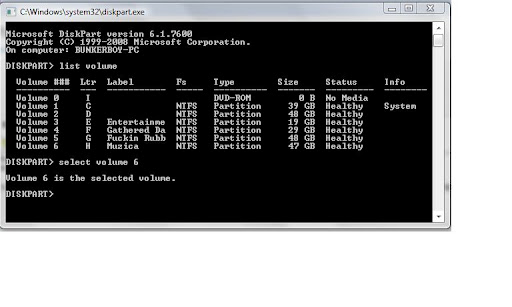
Now type - Remove letter h [h is my drive's letter [type the letter of your selected drive] ]
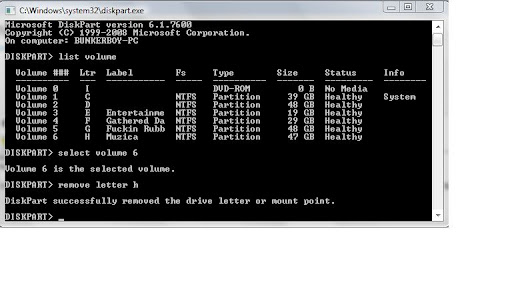
Congo!! now the Drive is Hidden!!
IF it is not hidden though, do reboot ur System
How to Unhide the Drive
Do Step 1 ,2 and 3 Again
1>Press Start+R[Run]
2>Type List Volume
3>Select Volume
Now when u see the msg that the volume is selected,
Type - Assign letter=h[Letter that was of ur Drive]
Done
NOTE: This trick can not Hide System Drive [C:]
New 4 Newbies
old 4 oldies
Comments are welcome!!
How to Hide the whole drive
First Press Start+R [Run]
Type - diskpart and hit Enter
A command window will appear like this
Now type -select volume [Your Volume number of the drive you want to hide ]

It will list all the drives of ur PC/Lappi

Now type - Remove letter h [h is my drive's letter [type the letter of your selected drive] ]

Congo!! now the Drive is Hidden!!
IF it is not hidden though, do reboot ur System
How to Unhide the Drive
Do Step 1 ,2 and 3 Again
1>Press Start+R[Run]
2>Type List Volume
3>Select Volume
Now when u see the msg that the volume is selected,
Type - Assign letter=h[Letter that was of ur Drive]
Done
NOTE: This trick can not Hide System Drive [C:]
New 4 Newbies
old 4 oldies
Comments are welcome!!


No comments:
Post a Comment
Your Words Please??
Note: Only a member of this blog may post a comment.